Import from Harvest
Moving from Harvest? Migrate projects, clients, tasks, people and every time entry in the background. Only the workspace owner and admins can run an import.
Step by step
It runs in the background, so you can close the page.
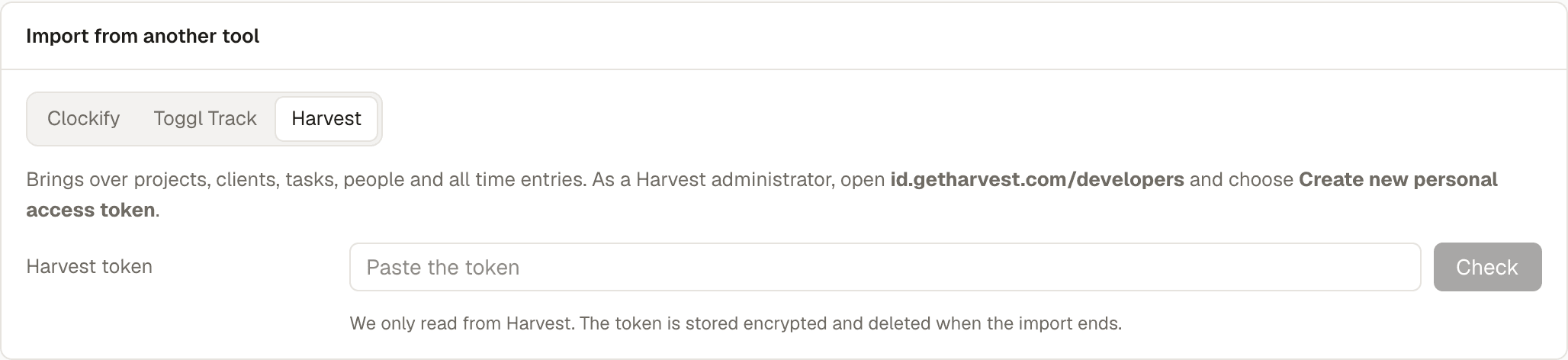
- Signed in to Harvest as an administrator, open id.getharvest.com/developers and choose Create new personal access token. Give it any name and copy the token. You don't need the Account ID.
- In TempusLog, open Settings, find Import from another tool, choose Harvest, paste the token and press Check.
- Check the preview: the Harvest account (pick one if you have several), how many projects, clients and people we found, and who isn't on your team yet.
- Optional: pick Entries from to import only recent time. Leave it empty to import everything.
- Press Start import. You can leave the page; we email you when it is done.
Good to know
- Safe to run again. A second run adds only what is new. Nothing gets duplicated.
- Nobody gets an email. People from Harvest are added to your team without an invite. Their time shows up right away, and you invite them from Team when you are ready.
- Archived people come in as inactive, so old reports still add up.
- Hours stay hours. Harvest usually keeps only how long you worked. Those entries come in with their length and date. If your account tracks start and end times, those come along too.
- Tasks are added to each project they were assigned to in Harvest. Harvest has no tags, so there are none to bring.
- Running timers are not imported. Stop them in Harvest first if you want them.
- Your token stays safe. We only read from Harvest. The token is stored encrypted and deleted when the import ends; you can also revoke it in Harvest afterwards. Rates are saved for later, for the paid Company plan.
Stuck? Email contact@mile.dev and we will help you move. Still deciding? See why teams switch from Harvest and TempusLog vs Harvest. Also moving from Clockify or Toggl? See Import from Clockify and Import from Toggl Track.
Ready to move?
Create a free account, then run the import from Settings.